A Guide to Terraform Flatten, Merge, and Lookup Functions

Cloud & DevOps Engineer
Terraform provides several built-in functions that help manage and manipulate data structures. In this guide, we will delve into three essential functions: flatten, merge, and lookup. Understanding these functions will enable you to write more efficient and readable Terraform configurations.
Link to GitHub Repo: https://github.com/vprasadreddy/terraform/tree/master/terraform-functions
variables.tf
variable "networks" {
  type = map(object({
    virtual_network_name = string
    cidr_block           = string
    subnets = list(object({
      name       = string
      cidr_block = string
    }))
  }))
}

variable "networks2" {
  type = map(object({
    virtual_network_name = string
    cidr_block           = string
    subnets = map(object({
      name       = string
      cidr_block = string
    }))
  }))
}
terraform.tfvars
networks = {
  virtual_network_1 = {
    virtual_network_name = "vnet1"
    cidr_block           = "10.1.0.0/16"
    subnets = [{
      name       = null
      cidr_block = "10.1.0.1/16"
      },
      {
        name       = "email_server"
        cidr_block = "10.1.1.2/16"
    }]
  },
  virtual_network_2 = {
    virtual_network_name = "vnet2"
    cidr_block           = "10.1.2.0/16"
    subnets = [{
      name       = "firewall"
      cidr_block = "10.1.2.1/16"
      },
      {
        name       = "db"
        cidr_block = "10.1.2.2/16"
    }]
  },
  virtual_network_3 = {
    virtual_network_name = "vnet3"
    cidr_block           = "10.1.3.0/16"
    subnets = [{
      name       = ""
      cidr_block = "10.1.3.1/16"
      },
      {
        name       = "backend"
        cidr_block = "10.1.3.2/16"
    }]
  }
}


networks2 = {
  virtual_network_1 = {
    virtual_network_name = "vnet1"
    cidr_block           = "10.1.0.0/16"
    subnets = {
      subnet_1 = {
        name       = null
        cidr_block = "10.1.0.1/16"
      },
      subnet_2 = {
        name       = "email_server"
        cidr_block = "10.1.1.2/16"
      }
    }
  },
  virtual_network_2 = {
    virtual_network_name = "vnet2"
    cidr_block           = "10.1.2.0/16"
    subnets = {
      subnet_1 = {
        name       = "firewall"
        cidr_block = "10.1.2.1/16"
      },
      subnet_2 = {
        name       = "db"
        cidr_block = "10.1.2.2/16"
    } }
  }
}
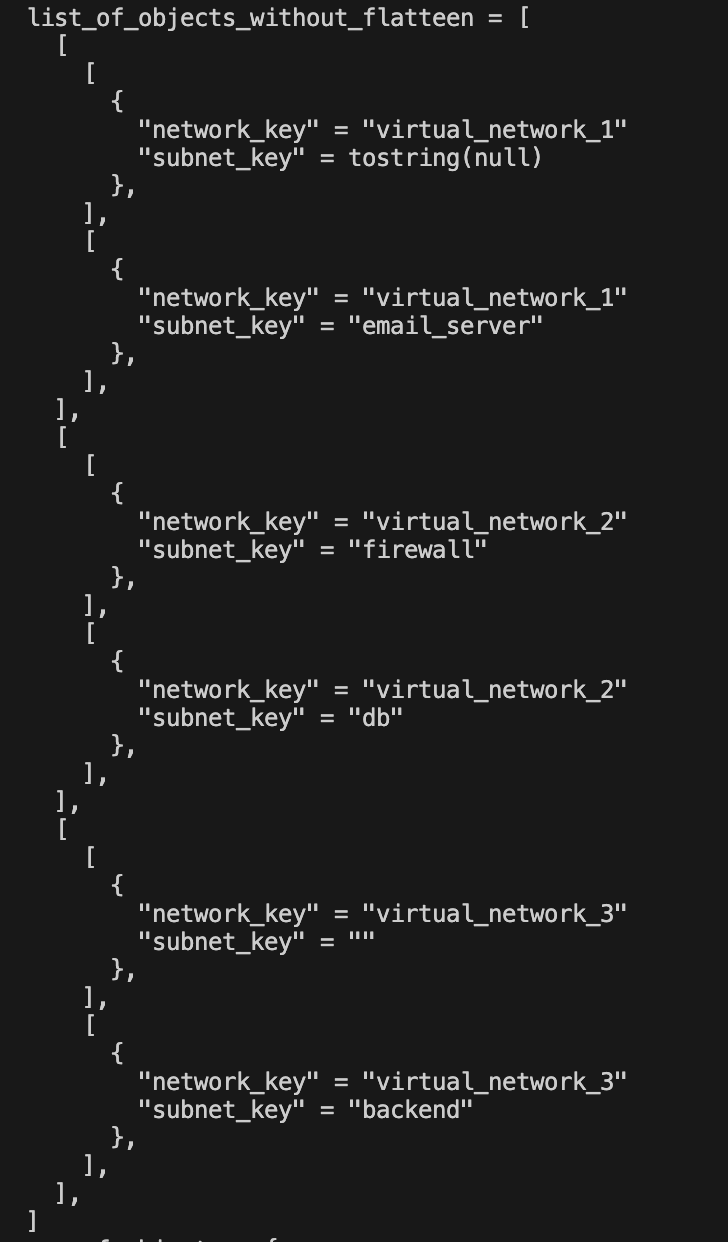
Without Flatten Function
main.tf
locals {
  list_of_objects_without_flatteen = [
    for network_key, network in var.networks : [for subnet_index, subnet in network.subnets : [
      {
        network_key = network_key,
        subnet_key  = subnet.name
      }
    ]]
  ]
output
Flatten Function
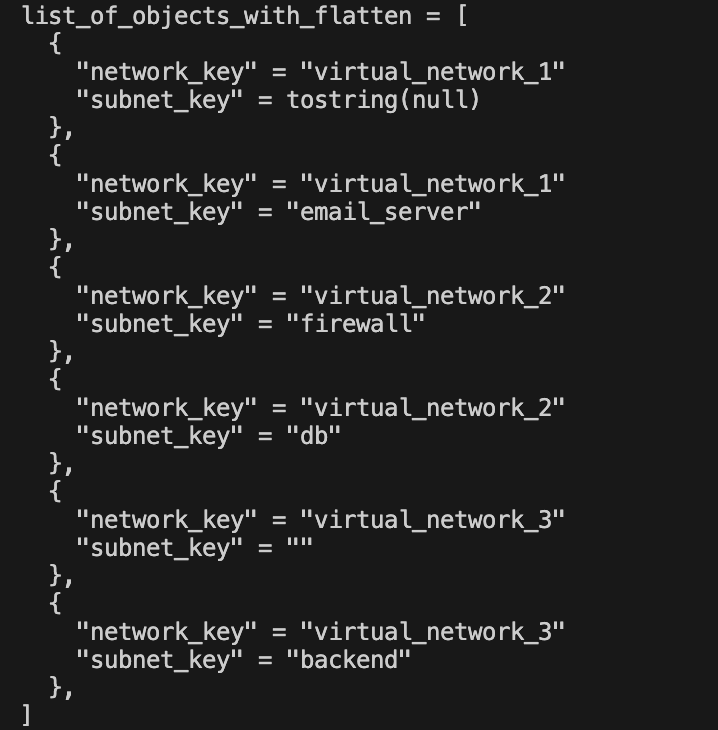
The terraform flatten function is used to simplify nested lists into a single list, making it easier to work with complex data structures in Terraform.
main.tf
  list_of_objects_with_flatten = flatten([
    for network_key, network in var.networks : [for subnet_index, subnet in network.subnets : [
      {
        network_key = network_key,
        subnet_key  = subnet.name
      }
    ]]
  ])
output
Lookup Function
Lookup Function
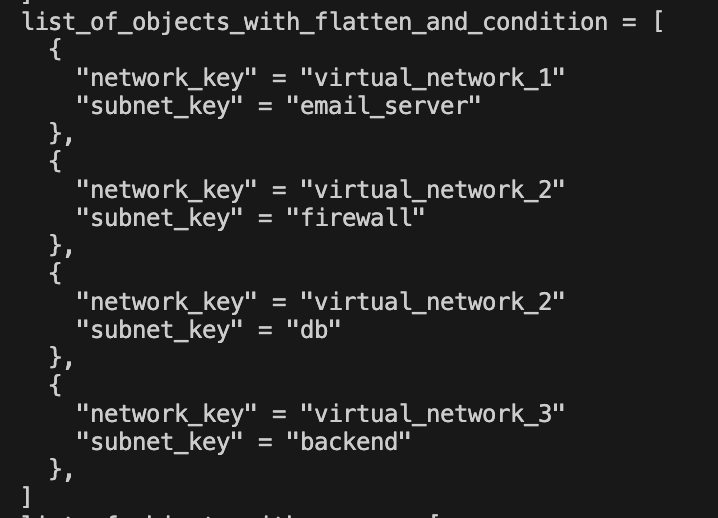
The Terraform lookup function allows you to retrieve values from maps or objects, providing a default value if the key is not found.
In the example below, we are filtering records for which subnet name is not equal to null
main.tf
  list_of_objects_with_flatten_and_condition = flatten([
    for network_key, network in var.networks : [for subnet_index, subnet in network.subnets : [
      {
        network_key = network_key,
        subnet_key  = subnet.name
      }
    ] if subnet.name != "" && lookup(subnet, "name", null) != null]
  ])
output
Merge Function
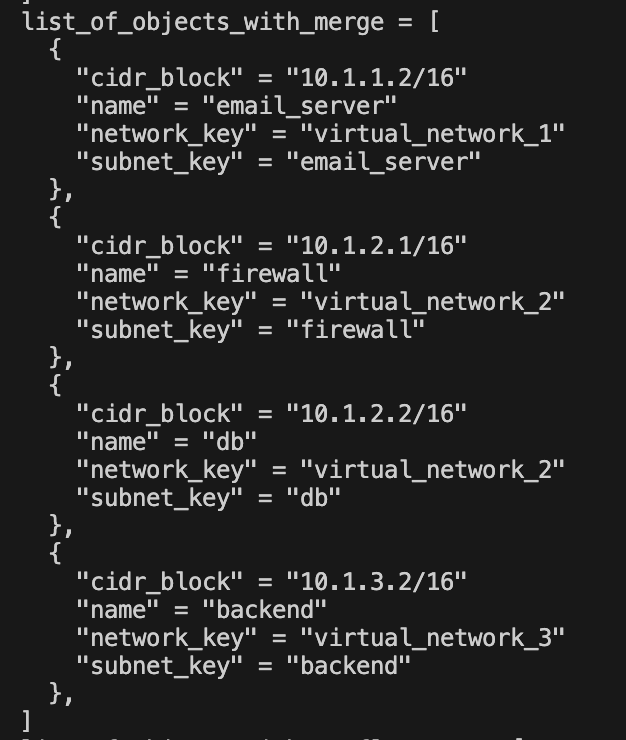
The Terraform merge function is used to combine multiple maps or objects into a single map. This is useful for aggregating data from different sources into one cohesive structure.
In the example below, we are merging each subnet properties(cidr_block, name) with network_key & subnet_key.
main.tf
  list_of_objects_with_merge = flatten([
    for network_key, network in var.networks : [for subnet_index, subnet in network.subnets : [
      merge({
        network_key = network_key,
        subnet_key  = subnet.name
      }, subnet)
  ] if subnet.name != "" && lookup(subnet, "name", null) != null]])
output
Conclusion
I hope you found this article helpful and learned how to Terraform Flatten, Merge, and Lookup Functions. If you enjoyed this article, please give it a like 👍 and follow me for more interesting and useful articles 😊.


